Paycheck clarity without the budget overwhelm

Your bank balance is not the same as money you can safely spend.

CalmPaycheck shows what’s left after the bills and everyday spending between now and your next payday. No monthly-budget maze. No daily transaction tracking. Just one clear answer when you need it.

Works in desktop Excel Works in free Excel for the web One-time download
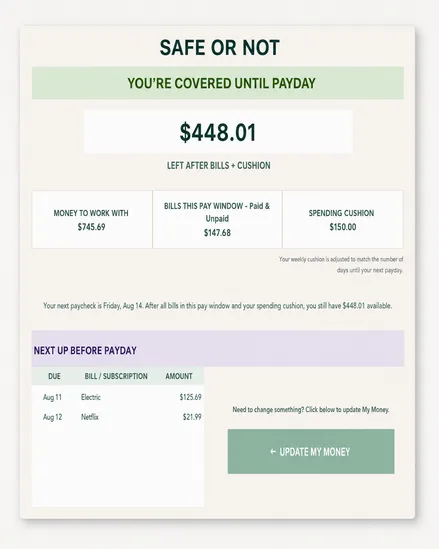
CalmPaycheck Safe or Not screen showing $448.01 left after bills and spending cushion until payday
The problem CalmPaycheck solves

A bank balance can look fine right up until it isn’t.

You open your bank app and see money sitting there. But some of it already belongs to rent, utilities, subscriptions, groceries, gas, or whatever has to happen before the next paycheck.

What your bank app says

It tells you how much money is currently in the account. It does not tell you how much of that money already has a job before payday.

Current balance$745.69

What CalmPaycheck says

It looks at the current pay window, subtracts the bills due before the next paycheck and your spending cushion, then gives you the amount that survives.

Left after bills + cushion$448.01
Simple by design

Set up the month. Then update one balance each payday.

CalmPaycheck is built around pay windows — the days between one payday and the next.

1

Add your paydays

Enter payday dates and expected paycheck amounts. CalmPaycheck figures out which pay window you are currently in.

2

Add your bills

Enter bills and subscriptions once for the month. Date order does not matter. Mark them paid after they actually clear.

3

Check Safe or Not

On payday, enter the bank balance you had immediately before that paycheck arrived. The dashboard does the rest.

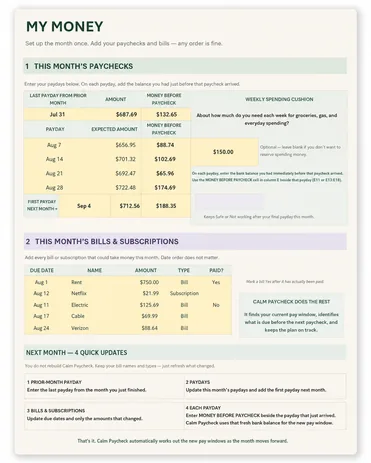
CalmPaycheck My Money screen with paydays, Money Before Paycheck, weekly spending cushion, bills and next-month update instructions
One setup screen

Everything CalmPaycheck needs lives on one page.

Paydays. Bills. Money Before Paycheck. Your weekly spending cushion. Nothing is hidden behind categories, envelopes, charts, or a pile of tabs.

Up to five current-month paychecks plus the bridge into next month.
Your spending cushion automatically scales to the number of days until the next payday.
Overdue unpaid bills stay visible instead of disappearing after their due date passes.
If you forget to refresh bill dates for a new month, CalmPaycheck stops and tells you.
The payoff

One screen answers the question that matters.

Safe or Not shows what you have to work with, what bills belong to the current pay window, how much cushion you reserved, and what is left after all of it.

See the dollar amount left after bills and cushion.
See what is coming up before payday.
See overdue unpaid bills until you mark them paid.
No mental math every time you open your bank account.
CalmPaycheck Safe or Not dashboard with pay-window totals and upcoming bills before payday
What this is not

CalmPaycheck is not another budget system you have to babysit.

The goal is not to make you become a spreadsheet person. The goal is to keep the important numbers out of your head and make the next decision easier.

daily transaction logging
dozens of spending categories
envelopes to constantly rebalance
subscription to pay every month
complicated charts to interpret
lecture about being “better with money”
Who it is for

Built for people who lose track of timing, not people who want another finance hobby.

CalmPaycheck may help if…

  • You look at your bank balance and still aren’t sure what you can safely spend.
  • Bills surprise you even though you technically knew they were coming.
  • Traditional monthly budgets are too much to maintain.
  • You need to see what matters between now and the next payday.

You probably do not need it if…

  • You already maintain a detailed budget consistently and enjoy doing it.
  • You want automatic bank syncing or transaction importing.
  • You want investment, debt-payoff, or net-worth tracking in the same tool.
  • You need a full accounting system rather than a paycheck-timing tool.
Free 5-minute check

Find out what’s actually safe until payday.

Get the free 5-Minute Safe Until Payday Checklist and quickly separate the money sitting in your account from the money that still needs to cover bills and everyday spending before your next paycheck.

See what money you have to work with
List only the bills that matter before payday
Set aside a realistic spending cushion
Calculate what is actually left
Free PDF. No complicated budgeting. Unsubscribe anytime.
Questions

A few straight answers.

No. The finished customer workbook has been tested in Excel for the web, Microsoft’s free browser version of Excel, as well as desktop Excel.
No. The formulas and layout are protected. You only enter information in the open input cells on My Money. Home and Safe or Not are designed to be read, not edited.
Not really. You set up the month, but CalmPaycheck calculates around the active pay window — the period from one payday to the next.
Enter the bank balance you had immediately before that paycheck arrived in the Money Before Paycheck cell beside that payday. CalmPaycheck uses that fresh balance to reset the new pay window.
Yes. Expected paycheck amounts can vary, and the Money Before Paycheck reset means each new pay window starts from the actual balance you had before that paycheck arrived.
No. CalmPaycheck is a one-time digital download that you can reuse month after month.
Know before you spend

Stop asking your bank balance a question it cannot answer.

CalmPaycheck was built to tell you what is left after the bills and everyday spending between now and the next payday.

Get CalmPaycheck →
Excel workbook · Works in free Excel for the web · One-time download